
Quantization Adaptation Guide#
This document provides guidance for adapting quantization algorithms and models related to ModelSlim.
Quantization Feature Introduction#
Quantization Inference Process#
The current process for registering and obtaining quantization methods in vLLM Ascend is as follows:
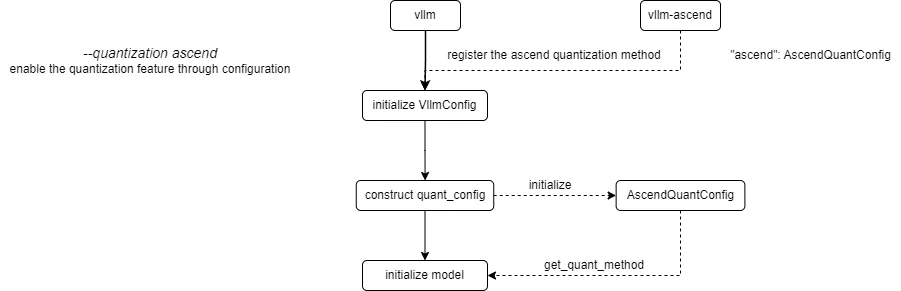
vLLM Ascend registers a custom Ascend quantization method. By configuring the --quantization ascend parameter (or quantization="ascend" for offline), the quantization feature is enabled. When constructing the quant_config, the registered AscendModelSlimConfig is initialized and get_quant_method is called to obtain the quantization method corresponding to each weight part, stored in the quant_method attribute.
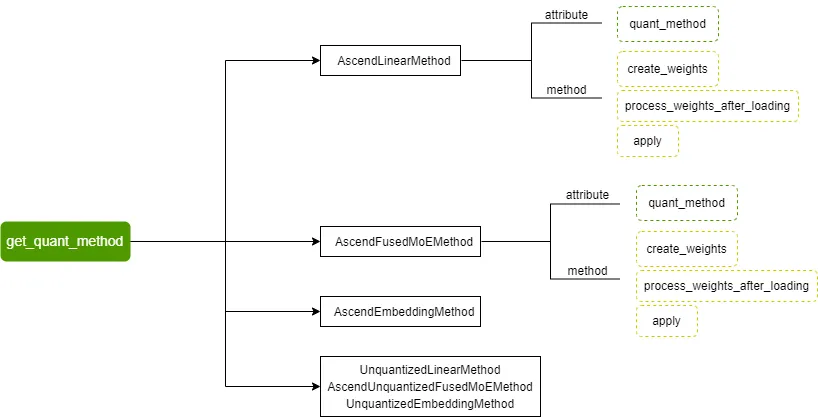
Currently supported quantization methods include AscendLinearMethod, AscendFusedMoEMethod, AscendEmbeddingMethod, and their corresponding non-quantized methods:
The quantization method base class defined by vLLM and the overall call flow of quantization methods are as follows:
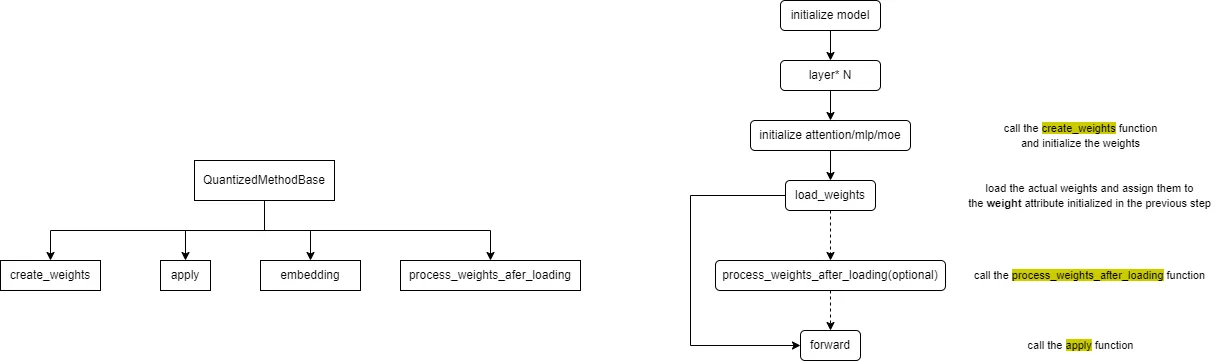
The embedding method is generally not implemented for quantization, focusing only on the other three methods.
The create_weights method is used for weight initialization; the process_weights_after_loading method is used for weight post-processing, such as transposition, format conversion, data type conversion, etc.; the apply method is used to perform activation quantization and quantized matrix multiplication calculations during the forward process.
We need to implement the create_weights, process_weights_after_loading, and apply methods for different layers (attention, mlp, moe).
Supplement: When loading the model, the quantized model’s description file quant_model_description.json needs to be read. This file describes the quantization configuration and parameters for each part of the model weights, for example:
{
    "model.layers.0.linear_attn.dt_bias": "FLOAT",
    "model.layers.0.linear_attn.A_log": "FLOAT",
    "model.layers.0.linear_attn.conv1d.weight": "FLOAT",
    "model.layers.0.linear_attn.in_proj_qkvz.weight": "W8A8_DYNAMIC",
    "model.layers.0.linear_attn.in_proj_qkvz.weight_scale": "W8A8_DYNAMIC",
    "model.layers.0.linear_attn.in_proj_qkvz.weight_offset": "W8A8_DYNAMIC",
    "model.layers.0.linear_attn.in_proj_ba.weight": "FLOAT",
    "model.layers.0.linear_attn.norm.weight": "FLOAT",
    "model.layers.0.linear_attn.out_proj.weight": "FLOAT",
    "model.layers.0.mlp.gate.weight": "FLOAT",
    "model.layers.0.mlp.experts.0.gate_proj.weight": "W8A8_DYNAMIC",
    "model.layers.0.mlp.experts.0.gate_proj.weight_scale": "W8A8_DYNAMIC",
    "model.layers.0.mlp.experts.0.gate_proj.weight_offset": "W8A8_DYNAMIC",
}
Based on the above content, we present a brief description of the adaptation process for quantization algorithms and quantized models.
Quantization Algorithm Adaptation#
Step 1: Algorithm Design. Define the algorithm ID (e.g.,
W4A8_DYNAMIC), determine supported layers (linear, moe, attention), and design the quantization scheme (static/dynamic, pertensor/perchannel/pergroup).Step 2: Registration. Use the
@register_schemedecorator invllm_ascend/quantization/methods/registry.pyto register your quantization scheme class.
from vllm_ascend.quantization.methods import register_scheme, AscendLinearScheme

@register_scheme("W4A8_DYNAMIC", "linear")
class AscendW4A8DynamicLinearMethod(AscendLinearScheme):
    ...

@register_scheme("W4A8_DYNAMIC", "moe")
class AscendW4A8DynamicFusedMoEMethod(AscendMoEScheme):
    ...
Step 3: Implementation. Create an algorithm implementation file, such as
vllm_ascend/quantization/methods/w4a8.py, and implement the method class and logic.Step 4: Testing. Use your algorithm to generate quantization configurations and verify correctness and performance on target models and hardware.
Quantized Model Adaptation#
Adapting a new quantized model requires ensuring the following three points:
The original model has been successfully adapted in
vLLM Ascend.Fused Module Mapping: Add the model’s
model_typetopacked_modules_model_mappinginvllm_ascend/quantization/modelslim_config.py(e.g.,qkv_proj,gate_up_proj,experts) to ensure sharding consistency and correct loading.
packed_modules_model_mapping = {
    "qwen3_moe": {
        "qkv_proj": [
            "q_proj",
            "k_proj",
            "v_proj",
        ],
        "gate_up_proj": [
            "gate_proj",
            "up_proj",
        ],
        "experts":
        ["experts.0.gate_proj", "experts.0.up_proj", "experts.0.down_proj"],
    },
}
All quantization algorithms used by the quantized model have been integrated into the
quantizationmodule.
Currently Supported Quantization Algorithms#
vLLM Ascend supports multiple quantization algorithms. The following table provides an overview of each quantization algorithm based on the implementation in the vllm_ascend.quantization module:
Algorithm |
Weight |
Activation |
Weight Granularity |
Activation Granularity |
Type |
Description |
|---|---|---|---|---|---|---|
|
INT4 |
FP16/BF16 |
Per-Group |
Per-Tensor |
Static |
4-bit weight quantization with 16-bit activation precision, specifically designed for MoE model expert layers, supporting int32 format weight packing |
|
INT8 |
FP16/BF16 |
Per-Channel |
Per-Tensor |
Static |
8-bit weight quantization with 16-bit activation precision, balancing accuracy and performance, suitable for linear layers |
|
INT8 |
INT8 |
Per-Channel |
Per-Tensor |
Static |
Static activation quantization, suitable for scenarios requiring high precision |
|
INT8 |
INT8 |
Per-Channel |
Per-Token |
Dynamic |
Dynamic activation quantization with per-token scaling factor calculation |
|
INT4 |
INT8 |
Per-Group |
Per-Token |
Dynamic |
Supports both direct per-channel quantization to 4-bit and two-step quantization (per-channel to 8-bit then per-group to 4-bit) |
|
INT4 |
INT4 |
Per-Channel |
Per-Token |
Dynamic |
Uses FlatQuant for activation distribution smoothing before 4-bit dynamic quantization, with additional matrix multiplications for precision preservation |
|
INT8 |
INT8 |
Per-Channel |
Per-Tensor/Token |
Mixed |
PD Colocation Scenario uses dynamic quantization for both P node and D node; PD Disaggregation Scenario uses dynamic quantization for P node and static for D node |
Static vs Dynamic: Static quantization uses pre-computed scaling factors with better performance, while dynamic quantization computes scaling factors on-the-fly for each token/activation tensor with higher precision.
Granularity: Refers to the scope of scaling factor computation (e.g., per-tensor, per-channel, per-group).